How to Run Ralph Loops
Learn how to run Ralph loops to reliably reach a business objective using AI—draft, critique, revise, and verify with clear stop conditions, rubrics, and templates.

Dan Duke—A Ralph loop is a simple way to make AI outputs reliable by repeating a controlled process: draft → critique → revise → verify—until you hit a defined “done” standard or a predetermined maximum number of rounds.
It's a way to address a common problem with AI—inconsistent results.
This guide shows how to use Ralph loops in a no-code, average-person-friendly way. You'll be able to accomplish real business objectives like writing a sales email sequence, creating an SOP, drafting a landing page section, or building a content brief.
How to use Ralph loops
To run a Ralph loop, define one business deliverable and the acceptance criteria that determine “done” (accuracy, clarity, tone, format, constraints). Then iterate:
Draft a first version
Critique using a scoring rubric
Revise to create version 2
Verify/fact-check
Repeat for a fixed number of rounds (usually 3–5) or until the output meets your threshold.
Ralph loops work because they add guardrails, a quality checklist, and stop conditions, turning AI from a one-shot tool into a repeatable workflow.
What is a Ralph loop (plain English)?
A Ralph loop is an iterative loop used to get high-quality results from an AI assistant. Instead of asking for “the perfect answer” in one prompt, you run multiple short passes where the output is evaluated against explicit criteria, improved, and re-checked.
The name stems from Ralph Wiggum, the character in "The Simpsons" who is a dim bulb, but is very persistent.
In some ways, the loop mimics how professionals work:
Writers draft, edit, and proof.
Analysts form a hypothesis, test it, and refine.
Product teams ship, measure, and iterate.
A Ralph loop harnesses the power of that versioning mindset. In a sense, it's an automated form of red-teaming AI content—methodically searching for flaws and correcting them.
At Rellify, we also have found another type of Ralph loop to be valuable. We program our agent AI tools in Rex to perform certain tasks at the same time every day.
For example, we instruct Rex to pull certain data every morning, analyze it, and send the resulting insights to a defined set of team members. Of course, Rex delivers those results on interactive smart cards, which present information in easy-to-understand charts, dashboards, tables, and mini-apps.
When Ralph loops work best (and when they don’t)
Ralph loops are ideal when…
You can clearly define:
The deliverable (what you want produced)
The audience (whom it’s for)
The constraints (tone, format, do/don’t, compliance)
The acceptance criteria (what “good” means)
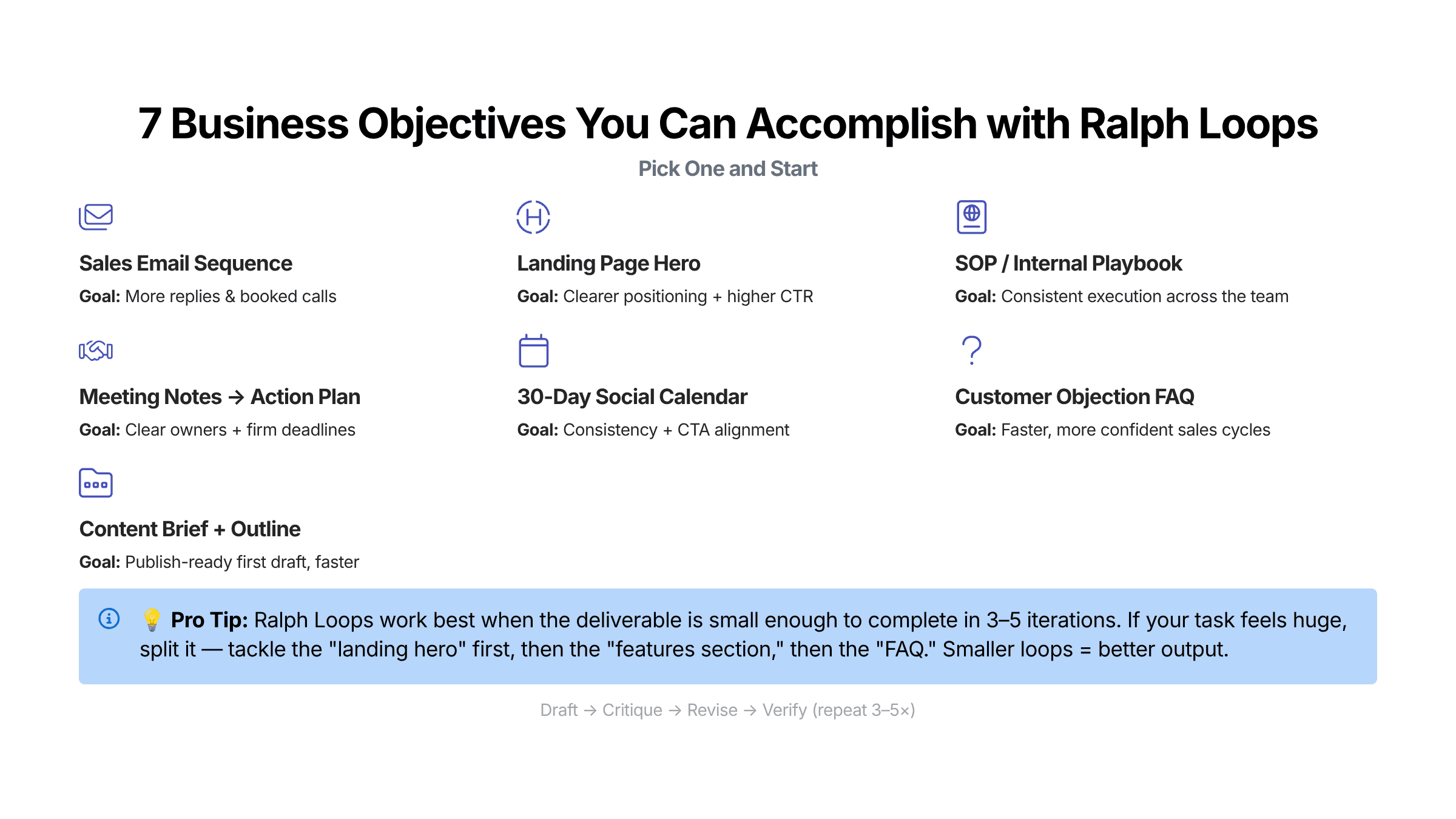
Great business use cases:
A 5–7 email welcome sequence
A landing page hero section + benefit bullets + CTA
A sales call follow-up email + objection handling FAQ
An SOP your team can follow without asking questions
A content brief + outline for a blog post
When NOT to use a Ralph loop (important guardrail)
Don’t loop on:
High-stakes legal, medical, or financial decisions without expert review
Tasks with no clear “done” definition—you’ll get thrashing instead of progress
Work without source-of-truth inputs—you’ll amplify hallucinations
Rule of thumb: If you can’t score it, you can’t reliably improve it.
The no-code 5-step method to run Ralph loops (templates included)
Step 1: Pick one business deliverable (not a vague goal)
A Ralph loop needs a target. Not “improve marketing,” but something you can deliver and evaluate.
Bad goal: “Make my website convert better.”
Good deliverable: “Write a new homepage hero section with headline + subhead + 5 benefit bullets + 1 CTA.”
Deliverable spec template (copy/paste):
Deliverable:
Audience:
Business objective: (what success looks like)
Inputs (source of truth): (bullets, notes, links, product details)
Constraints / guardrails: (tone, banned claims, required elements, length)
Output format: (exact structure you want)
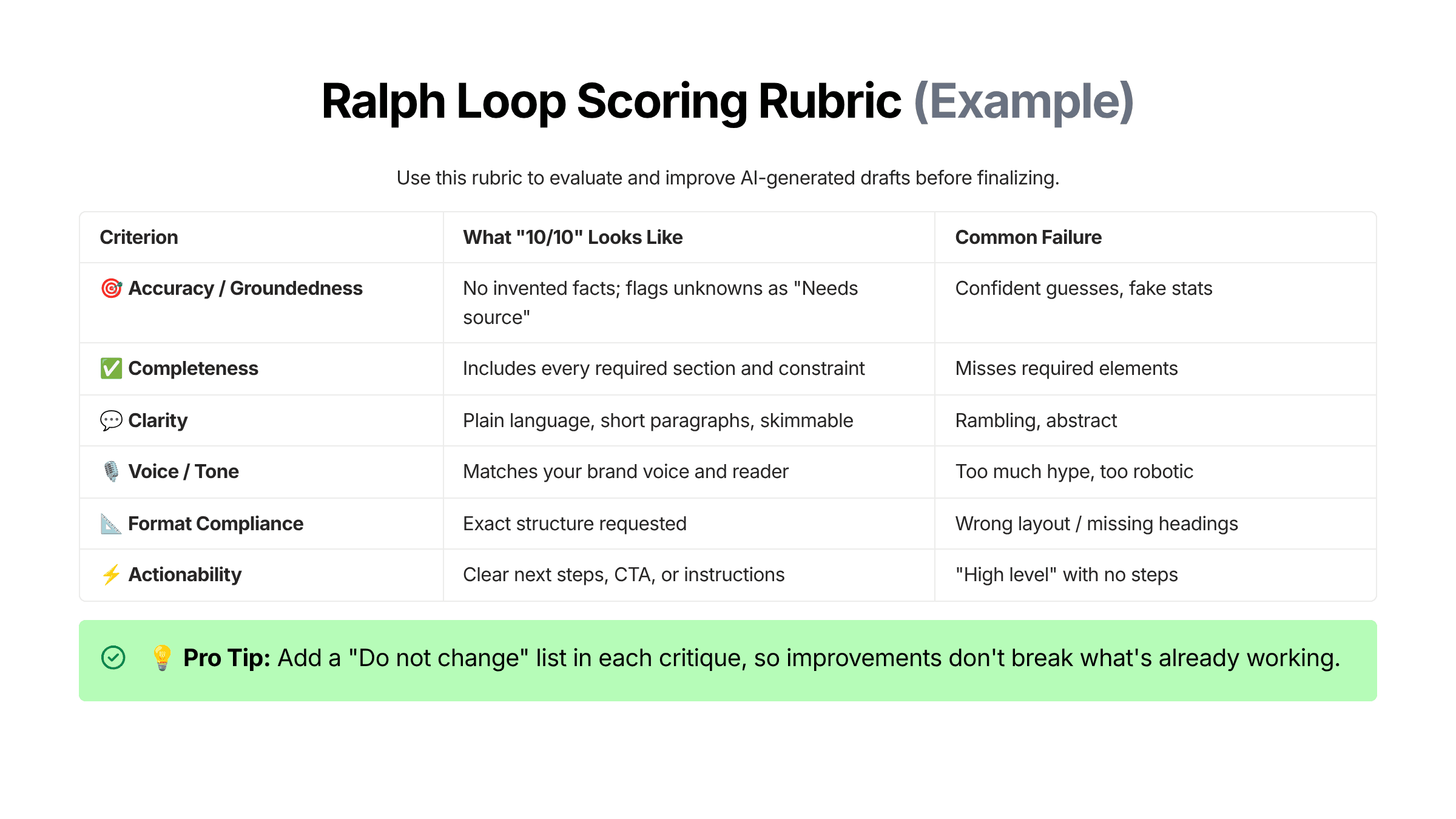
Step 2: Create acceptance criteria (your evaluation rubric)
This is the engine of the loop: a scoring system that turns “make it better” into measurable improvement.
Use a simple 1–10 scale. Your first rubric can be lightweight:
Step 3: Set stop conditions + guardrails (so the loop ends)
A Ralph loop becomes powerful when it has a clear finish line.
Recommended defaults:
Max iterations. 3–5
Stop condition. All criteria score equal to or better than 8 out of 10
Hard stop. If revisions become cosmetic or repetitive
Safety stop. If accuracy risk remains, require human review
Why this matters: Without stop conditions, you’ll keep iterating forever—and often degrade the output (over-editing can make it generic).
Step 4: Run the loop prompts (Draft → Critique → Revise)
Below are three copy/paste templates. Use them in ChatGPT, Claude, Gemini—or inside an agentic AI tool like Rellify’s Rex.
Template A — Draft (v1)
You are helping me accomplish a business objective using a Ralph loop.
DELIVERABLE: What you want created
AUDIENCE: Whom this is for
BUSINESS OBJECTIVE: What success means
SOURCE OF TRUTH INPUTS:
Bullet 1
Bullet 2
Bullet 3
CONSTRAINTS / GUARDRAILS:
Tone: e.g., clear, practical, no hype
Do not invent facts or statistics.
If something is unknown, write “Needs source” instead of guessing.
Length: optional
Must include: required elements
OUTPUT FORMAT (exact):
1) Section
2) Section
3) Section
Create Version 1 (v1).
Template B — Critique (scored rubric + top fixes)
Critique v1 using this rubric (score 1–10 each): accuracy, completeness, clarity, voice, format compliance, actionability.
Return:
A score table
The top 3 highest-impact fixes (the smallest changes that produce the biggest quality lift)
A “Do not change” list (what is already working)
Any “Needs source” claims you detected
Template C — Revise (v2 + changelog)
Revise v1 into Version 2 (v2) by implementing the top 3 fixes.
Rules:
Preserve anything listed as “Do not change.”
If a claim needs a source and we don’t have one, rewrite it to be accurate without the claim or mark it “Needs source.”
Output:
v2 deliverable
Changelog: what changed and why
Updated score table
Step 5: Verify + ship (final quality checklist)
Before you finalize the process, review this quality checklist:
Did you keep or remove anything marked "Needs source"?
Is it skimmable (short paragraphs, bullets, clear headings)?
Does it match the output format exactly?
Is the CTA or next step clear?
Did you stop because you hit your acceptance criteria—not because you got tired?
This last step is your hallucination check and final QA pass.
Worked example: A Ralph loop to accomplish a business objective (no code)
Now we'll show you how to fill out and use those templates, based on a common business objective.
Objective
Create a 1-page SOP for handling inbound demo requests so your team responds quickly, qualifies consistently, and increases conversion.
Deliverable spec (filled out)
Deliverable: SOP: “Inbound Demo Request Handling”
Audience: Sales/CS team members who respond to inbound leads
Business objective: Faster response time + better qualification + consistent follow-up
Source of truth inputs:
We offer a product called Rellify (AI agent workflows + content intelligence)
Primary CTA is “Request a demo”
We want to avoid over-promising outcomes
We want a professional, helpful tone
Constraints:
No false claims (no guaranteed results)
Must include: response timeline, qualification questions, next-step options
Output format:
Purpose
Scope
Steps (numbered)
Templates (email snippets)
Escalation rules
Definition of done
What v1 often looks like (excerpt)
Typically, v1 is decent but:
too generic (“follow best practices”)
missing specifics (timeline, exact questions)
unclear on “definition of done”
Critique (what you want the AI to say)
Top 3 fixes might be:
Add a time-bound SLA (“Respond within 15 minutes during business hours”)
Add a qualification block (budget/timeline/problem/use case)
Add “Definition of done” + escalation conditions
v2 (what you expect after revision)
Now the SOP becomes operational: clear steps, templates, and decision points—something a new team member can run without improvising.
Stop decision:
If v2 scores equal to or greater than 8 out of 10 across the rubric, you ship. If not, you run one more loop focused only on the lowest-scoring criterion (often clarity or format compliance).
Common mistakes (and how to fix them)
Mistake 1: Looping on a task that’s too big
Symptom. Each iteration introduces new sections instead of improving quality.
Fix. Shrink the scope. One deliverable per loop.
Mistake 2: No rubric (or a vague rubric)
Symptom. “Make it better” produces random changes.
Fix. Require scoring + top 3 fixes.
Mistake 3: No source of truth inputs
Symptom. Confident but inaccurate claims.
Fix. Paste your inputs; require “Needs source” flags.
Mistake 4: No stop condition
Symptom. Endless tinkering.
Fix. Cap at 3–5 rounds; stop at threshold.
Mistake 5: The critique destroys what’s working
Symptom. Improvements feel like regressions.
Fix. Add the “Do not change” list and preserve it in revisions.
FAQ
How many iterations should a Ralph loop run?
Most business tasks converge in 3–5 iterations. If you’re still making major structural changes after iteration 5, the task is probably too large or the acceptance criteria are unclear.
What’s the best stop condition for a Ralph loop?
A practical default is: stop when every rubric category scores ≥ 8/10, or when the latest changes are cosmetic and no longer improve the business goal.
Can I run Ralph loops without coding?
Yes. You can run a Ralph loop in any AI chat tool by using templates for draft, critique, revise, and verify, plus a maximum iteration count.
How do I prevent hallucinations in a Ralph loop?
Use three guardrails:
Provide source-of-truth inputs
Require the model to flag “Needs source” instead of guessing
Add a final verification step (fact-check/high-risk claim review)
What business tasks benefit most from Ralph loops?
Tasks with clear “done” criteria: SOPs, emails, landing copy, content briefs, summaries with action items, and structured plans (launch plans, campaign briefs, investigation plans).
How to make Ralph loops repeatable across a team (the Rellify angle)
A Ralph loop is powerful when you use it just once. It’s transformational when you standardize it. If you want your team to produce consistent outputs:
Turn your best loops into repeatable workflows. This means creating a playbook, or, in Rex, a blueprint.
Use structured outputs (tables, checklists) so results don’t vary by prompt mood.
Store rubrics by deliverable type: emails, SOPs, landing pages, briefs.
Ready to turn Ralph loops into a repeatable advantage? Rellify’s AI services are built for exactly this kind of structured, outcome-driven work.
And with our blueprints, you can generate real business deliverables without reinventing the process every time. These reusable workflows capture your best prompts, rubrics, guardrails, and stop conditions so your team gets consistent results at scale.
Want to see it in action? Start a free trial on Rex today.
About the author

Daniel Duke
Editor-in-Chief, Americas
Dan’s extensive experience in the editorial world, including 27 years at The Virginian-Pilot, Virginia’s largest daily newspaper, helps Rellify to produce first-class content for our clients.
He has written and edited award-winning articles and projects, covering areas such as technology, business, healthcare, entertainment, food, the military, education, government and spot news. He also has edited several books, both fiction and nonfiction.
His journalism experience helps him to create lively, engaging articles that get to the heart of each subject. And his SEO experience helps him to make the most of Rellify’s AI tools while making sure that articles have the specific information and voicing that each client needs to reach its target audience and rank well in online searches.
Dan’s leadership has helped us form quality relationships with clients and writers alike.


