How AI Model Pricing Works and How SMBs Can Control Costs
This practical guide to AI model pricing for business includes a checklist for reducing AI costs and governing usage.

Key takeaways
AI spend is driven by seat licenses plus token usage. Predictability comes from baselines, routing rules, and adoption measurement across teams.
Optimize costs by shrinking context, limiting output length, batching work, and sending routine tasks to cheaper models that meet quality standards.
Rellify's model-agnostic harness enables users to avoid vendor lock-in. You can control costs by choosing the model that fits the task at hand.
Peter Kraus—If you’re evaluating AI model pricing for business, the hardest part isn’t finding a number on a pricing page. It’s predicting what you’ll actually spend once your people start using AI every day—across marketing, sales, operations, finance, and customer support.
AI spend usually comes from two buckets, each of which poses risks for SMBs:
Seat licenses (e.g., Copilot, team plans). Seat-based pricing offers predictable monthly costs (fixed price per user). But if adoption is uneven, you pay for licenses that aren’t delivering outcomes. To avoid wasted spend you must manage adoption and workflow standardization.
Token pricing (e.g., Claude API, Gemini API). Usage-based tools feel flexible, because you pay per token. But costs can spike because of long prompts, long outputs, repeated context, and “just try it” experimentation. You need guardrails.
Some platforms, including ChatGPT, combine seats, usage, and add-ons like grounding/search, agents, and premium features. These could still present the risk of invisible multipliers—unless you track them explicitly. What happens if you don't understand AI pricing? You could end up like the enterprise client that reportedly got smacked with a $500 million bill for one month of Claude usage.
To control costs, small and medium-sized businesses can achieve the biggest gains by doing four things:
Stay up-to-date with model cost efficiency benchmarks. These can give you a rough idea of the relative cost of actual usage between models. Not all models use tokens at the same rate for a given task.
Route work to the cheapest model that meets quality. Not every task needs a top-tier model.
Reduce repeated context. Use templates, summarization, batching, and caching where available.
Govern usage. Set budgets and policies, and use outcome-based reporting—cost per deliverable, not cost per token.
Another way to control costs is to avoid vendor lock-in by using a model-agnostic harness, like Rellify's Rex. That way, you can choose from among several models to find the right balance between efficiency and quality for a given task.
This guide on AI model pricing for businesses examines costs for Claude, Gemini, ChatGPT, and Microsoft Copilot. We'll also give you a practical playbook for reducing AI costs without sacrificing quality and show you how using our Rex AI model can help you control costs.
Editor's note: Vendor prices change frequently. Where we reference example list prices, confirm the latest on the vendor’s official pricing pages before final budgeting.
Quick cost comparison: Claude vs. Gemini vs. Copilot vs. ChatGPT
Here’s a practical way to compare these options without getting lost in feature lists.
Claude pricing (API token pricing)
Claude API pricing is usage-based: you pay for input and output tokens. On Claude’s pricing page, Anthropic lists example rates (shown as “per MTok,” i.e., per million tokens) by model tier, with higher output costs than input (which matters because many teams unintentionally over-generate). Source to check: https://claude.com/pricing (API section)
Claude Team + Cowork (seat-based collaboration layer)
For SMBs, Cowork typically shows up as part of how teams collaborate in a shared Claude environment (projects, shared context, admin/billing), which is usually seat-based. Claude’s Team plan page shows seat pricing (standard vs. premium seats) and emphasizes mixing seat types depending on needs. Source to check: https://claude.com/pricing/team
Gemini pricing (API token pricing + tiers)
Gemini API pricing is also token-based. Google publishes detailed tables (including standard vs. batch pricing and caching/storage pricing). Source to check: https://ai.google.dev/gemini-api/docs/pricing
Microsoft Copilot pricing (seat-based)
Microsoft Copilot is generally evaluated as a per-user, per-month cost that’s tied to Microsoft 365 licensing and rollout strategy.
For SMB-specific pricing context, Microsoft’s partner materials often reference a per-user price point and plan bundles. Example source: https://partner.microsoft.com/en-us/blog/article/partner-led-smb-m365-copilot
ChatGPT (team/enterprise)
ChatGPT is typically evaluated as a seat-based purchase (ChatGPT Team/Enterprise), with optional usage-based spend if you also build with the OpenAI API.
For SMBs, ChatGPT can feel “cheap and easy” to roll out quickly. However, the costs depend on adoption (are people using it weekly?) and governance (are employees using personal accounts or approved business accounts?). It can give you a fast way to give many employees access to a general assistant for writing, ideation, analysis, and Q&A.
Common cost pitfalls:
Seat waste. If you buy seats broadly without defining 3–5 standard weekly workflows per role, utilization often stalls and cost per active user spikes.
Shadow AI. Teams often keep using personal/free accounts “on the side,” which undermines the AI usage policy and makes spend + risk harder to manage.
Two-track spend. If product/ops teams also use the OpenAI API for automations, you can end up with seat spend and token spend—without a single consolidated view.
The metric that predicts AI cost surprises: “Context”
If you remember one concept from this article, make it this:
Costs scale with context.
Context includes things like:
Long prompts
Large attachments
Pasted meeting transcripts
Repeated brand guidelines and instructions
Long chat histories reused as “input”
In token-priced systems, context directly drives cost. In seat-priced systems, context drives value—which impacts whether seat spend is justified.
This is why terms like “AI usage policy” and "workflow design" matter as much as “Claude pricing” or “Gemini pricing.”
How SMBs can avoid hidden AI costs
Not all models use tokens at the same rate for a given task. A model with a high cost per token could end up being cheaper in actual usage compared to a model with a cheaper cost per token if it uses fewer tokens to accomplish its work.
This is becoming a growing differentiator between OpenAI's GPT models and Anthropic's models.
With Rellify and Rex, you can put this knowledge about AI model pricing to good use. Our model-agnostic harness enables users to avoid vendor lock-in. You can control costs by choosing the model that fits the task at hand.
While the cost per token of OpenAI models is within the ballpark of Anthropic, OpenAI's token efficiency is improving with each release. For example, GPT 5.5 is more expensive per token than Opus 4.8, ($5 in and $30 out vs. $5 in and $25 out), but one analysis showed that GPT 5.5 ended up being about 30% cheaper than Opus 4.8.
GPT 5.5 uses about 50% fewer tokens than Opus 4.8, according to an Artificial Analysis index.
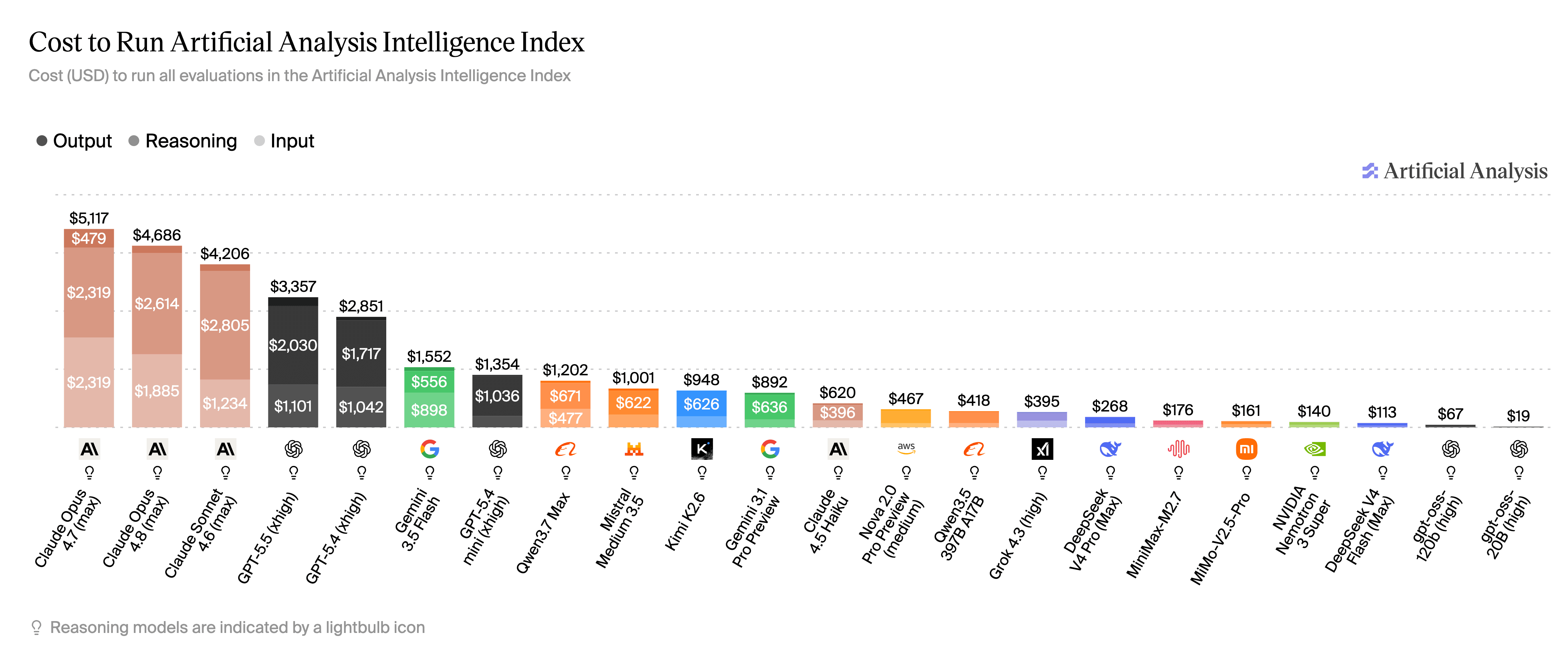
It's important to stay up-to-date with model cost efficiency benchmarks. They can give a rough idea of the relative cost of actual usage between models.
Here are three other things to consider about model costs:
1) Paying for seats without adoption
Seat-based AI fails quietly. There's no surprisingly large bill—just slow, creeping waste. To avoid this, track adoption weekly, looking at:
Seats purchased.
Weekly active users.
Workflows completed (not just “opened Copilot”).
2) Paying for tokens without constraints
Token-based AI failure lands with a big thud—an alarmingly large bill. The fix is to put guardrails in place:
Default to “short answers.”
Templates that limit context.
Batching and summarization steps.
3) Paying twice for the same work
This is the most common cost trap:
Different teams rebuild similar workflows.
People repeat context manually.
“Prompting” becomes artisanal instead of operational.
To fix this, SMBs can standardize workflows into reusable templates and playbooks—and treat them like business assets.
10 practical ways to optimize AI model costs
Here are some effective ways that businesses can optimize LLM costs:
Route tasks by tier. Use a cheap, fast model for tasks like classification, extraction, drafts. Use a premium model for final reasoning, critical decisions, high-stakes writing.
Default to short outputs. Make verbosity opt-in, not default.
Trim prompts and remove repeated instructions. Turn long instructions into a short template. Avoid pasting full threads unless required.
Summarize before you reuse context. Instruct your model to “summarize a thread → then ask the next question.” Don’t keep resending the full conversation.
Batch similar tasks. Review 20 items in one run instead of 20 separate runs.
Use caching where available. If your system supports prompt/context caching, use it for repeated context (brand guidelines, product specs).
Separate "thinking" from "writing." Do one reasoning pass, then produce a constrained output (bullets, table, JSON).
Set budgets and alerts by team. Treat AI like cloud spend by monitoring, employing budgets, and designating owners.
Publish an AI usage policy. Define what data can/can’t be used. Define approved tools by function. Define retention and review rules.
Measure cost per outcome (not cost per token). Cost per blog post shipped. Cost per proposal drafted. Cost per support ticket deflected. Cost per hour saved (only if you actually reclaim capacity).
How can I estimate token costs for my business?
You can determine the cost of seat pricing with a simple equation: seat pricing = seat cost x number of seats.
To determine API or token-based pricing, you should explore what usage metrics are available from the provider. These could include cost per request or token counts per request, however only broader buckets may be available, such as usage across an entire API key.
Take advantage of whatever partitioning is available to more accurately extrapolate pricing, such as using separate API keys, tags, or agents per domain.
A simple AI budget model
Here’s an SMB-friendly way to frame monthly AI cost:
Monthly AI cost = Seat spend + Token spend + Ops overhead
Where:
Seat spend = number of seats × price per seat/month
Token spend = workflow volume × average token cost per run
Ops overhead = time + tooling required to maintain workflows, policies, and reporting
How to use this model to make decisions
If seat spend dominates: Your biggest levers are adoption and standard workflows.
If token spend dominates: Your biggest levers are context control, routing, and batching.
If ops dominates: Your biggest levers are standardization and governance.
Can Rellify and Rex help SMBs with AI costs?
Rex is an AI agent system that coordinates agents, models, data, integrations, and reusable workflows to deliver reliable business results—not just interesting answers. With Rellify and Rex, there's no need to pick one model forever and for everything.
With our model-agnostic harness, businesses can avoid vendor lock-in and use the most cost-effective model for a given task. We can help SMBs:
Standardize workflows so teams aren’t reinventing prompts.
Make outcomes repeatable (not tied to one power user).
Keep AI usage governed (policy + budgets + visibility).
Preserve flexibility as model capabilities and prices change.
Our agentic AI tools can help you avoid high costs and context sprawl across disconnected chats and individual accounts. If you’re already paying for seats and experimenting with APIs, the next step isn’t “more AI.” It’s wisely using what you already have.
Start your free trial with Rex today or call to schedule a demonstration.
FAQs
What’s the difference between token pricing and seat pricing? Seat pricing is predictable per user but depends on adoption. Token pricing scales with usage and context—so you need constraints and routing.
Why do AI API bills spike unexpectedly? Because prompts and outputs grow over time, and teams repeat context. Batching, summarization, and output constraints are the fastest fixes.
Is Copilot cheaper than Claude or Gemini? Not inherently—Copilot is usually seat-based; Claude and Gemini can be token-based. “Cheaper” depends on adoption and how well workflows are standardized.
What’s the fastest way to reduce AI spend next month? Reclaim unused seats, constrain outputs by default, summarize reused context, and route routine tasks to cheaper models.
About the author

Peter Kraus
Chief Executive Officer
Peter Kraus is a seasoned architect of innovative business solutions that deliver significant value to clients and shareholders. In 1997, he founded a telecommunications real estate development company, achieving a remarkable 13:1 ROI by selling assets to a REIT within two years. He later joined a software start-up in 2000, pioneering the integrated travel and expense SaaS product and forging exclusive strategic partnerships for what became the Concur enterprise platform. With extensive experience in M&A activities and global supplier management, Peter negotiated and implemented industry-first solutions and led teams that launched e-receipt services and Concur Pay, processing over $40 million per month within the first year.
Peter's background in software development brings a balanced and intuitive approach to Rellify. His experience with global software solutions, including Concur's journey from start-up to its $8.3 billion exit to SAP, gives him exceptional insight into positioning Rellify for major growth opportunities. His visionary leadership motivates our global team as we bring the Rellify platform to life.


